SecureBoot Certificate Reporting Via Configuration Items Configmgr
If you've hit upon this posting, you are likely aware of the upcoming expiration of some certificates which are leveraged by SecureBoot. There are multiple ways to confirm whether or not it is "done".
One could do a CMPivot looking for the value of this regkey being the word "Updated"--but that may not cover ALL of the certs, just a couple of the certs, even if it says Updated.
Registry('HKLM:\\SYSTEM\\CurrentControlSet\\Control\\SecureBoot\\Servicing') | where Property == 'UEFICA2023Status'
One could do a CMPivot looking for the value of this regkey being the value of '2'
Registry('HKLM:\\SYSTEM\\CurrentControlSet\\Control\\SecureBoot\\Servicing') | where Property == 'WindowsUEFICA2023Capable'
And neither of those tell you whether or not you've done the revocation of the old cert yet, nor details of the other certs mentioned.
Using Trevor Jones' script (see below in Links), and the circumstances in my production environment, I've created 5 Configuration Items.
- Checks if the updated certificate, "CN=Microsoft Corporation KEK 2K CA 2023, O=Microsoft Corporation, C=US" is in the 'kek' database
- Checks if the updated certificate, "CN=Windows UEFI CA 2023, O=Microsoft Corporation, C=US" is in the 'db' database
- Checks if the updated certificate, "CN=Microsoft Corporation UEFI CA 2023, O=Microsoft Corporation, C=US" is in the 'db' database
- Checks if the updated certificate, "CN=Microsoft Option ROM UEFI CA 2023, O=Microsoft Corporation, C=US" is in the 'db' database
- Checks if the OLD certificate, "CN=Microsoft Windows Production PCA 2011, O=Microsoft Corporation, L=Redmond, S=Washington, C=US" is in the 'dbx' (revoked) database.
Using the Baseline with multiple configuration Items, you can monitoring and reporting when the 4 certs are all in the 'right' databases, and the old cert has been revoked.
Pre-requisites for Report to work:
Using the --> Attached <--, import the Baseline into your CM database, Compliance Settings, Configuration Baselines. Deploy the baseline 'SecureBoot Reporting Only', likely to a test collection first, just to confirm.
Note that on purpose and by design, the CIs will 'always' fail, that's because I want the result of the script to be reported, even if that result is "true", because I want the results to be available (relatively easily) for reporting. (it still isn't super easy to tease out, but I "tried" to make the results simple, even if the sql itself is not)
It is recommended that once this SecureBoot stuff is done, delete/disable/stop reporting on this information, it will no longer be relevant. For example, I could see that as new devices are released from vendors, there would never be a need to 'revoke' an expired cert that was never added to the db or kek databases originally, so the 'revoked' ci I could see starting late 2026 would never go "true", because there would be nothing to revoke.
Once you have the CIs running and reporting back, your report could look similar to this:
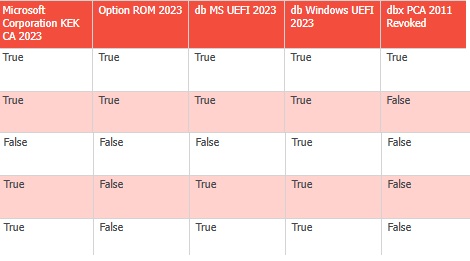
After you have updated to the latest certs, and wondering why the revocation is not happening? You might need to set the regkey AvailableUpdates to hex 0x0080 / decimal 128, triggers that scheduled task to 'Apply the Windows Production PCA 2011 to the DBX'. The DBX is where revoked certs go. Of course, do not revoke the old cert until all your boot media, etc., are updated.
Potentially helpful Links:
Trevor Jones' Original Script
https://smsagent.blog/2025/09/05/checking-for-updated-secure-boot-certificates/
fyi, one could use this simpler script to test for existence, but we've had Trevor's version in prod for a while...and I didn't want to change to this just to change, you are of course welcome to make your own CIs.
if([System.Text.Encoding]::
{
#it is there
} else {
#it is not there
}
OPTIONAL:
On purpose for reporting purposes, I made the CIs have a test for compliance where it would always fail by design even if the result was 'True'. If you prefer not to use the SQL query in the .zip with the baseline, you could modify each of the configuration items to instead have a text value of 'True' to mean compliant. That way, only 'false' results will be reported. The sql report as written may no longer work correctly; you'd have to use built-in reports or write your own if you change the Configuration Items provided.
- Created on .