SecureBoot Regkey AvailableUpdates reporting via ConfigMgr
Since you have landed on this blog, likely you are dealing with updating the will-expire-in-July 2026 certificates. There is plenty of Microsoft guidance, but it can be confusing as to where in the process your devices may be. If you happen to use the registry key method, and you have onprem Configuration Manager, you might be interested in using a custom inventory + report to monitor the progress of the value in 'AvailableUpdates', as your clients attempt to update the certificates. In --> Here <-- are some custom inventory mof files, and a sample sql query.
Assumptions:
- You leveraged the Registry Key method (either setting the regkey HKEY_LOCAL_MACHINE\SYSTEM\CurrentControlSet\Control\SecureBoot\AvailableUpdates to 5944 OR setting the Group Policy, as outlined in https://techcommunity.microsoft.com/blog/windows-itpro-blog/secure-boot-playbook-for-certificates-expiring-in-2026/4469235, Option 2 or Option 4).
Pre-requisites for the report to work:
- CM Console, Administration, Client Settings, Default Client settings (right-click properties), hardware inventory, Set Classes...search for "Firmware", confirm the 'firmware' inventory item is enabled. This will allow the clients to report whether or not SecureBoot is enabled at all, and whether it is legacy or UEFI type.
- Add the 'Add-ToConfiguration.mof.txt' to your configuration.mof on your server, in Inboxes\clifiles.src\hinv, within the section between Added extensions start and Added extensions end
- Monitor your server log 'dataldr.log' before you do the next thing, so you can watch it create the custom sql view.
- Import the 'ImportThis.mof' via your CM Console, Administration, Client Settings, Default Client settings (right-click properties), hardware inventory, Set Classes..., Import... and import the Import-This.mof
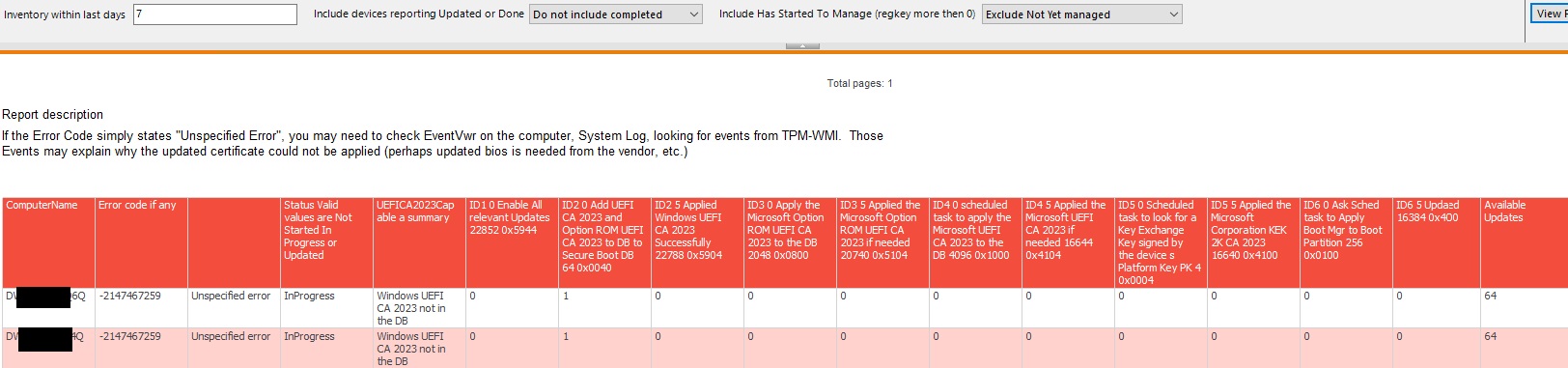
Once you've added that custom inventory for those registry keys (and waited a while for clients to report the values of those regkeys, might be a day or so), you can run the .sql attached, to monitor the regkeys in 'HKEY_LOCAL_MACHINE\SYSTEM\CurrentControlSet\Control\SecureBoot' as you defined.
According to https://support.microsoft.com/en-us/topic/secure-boot-certificate-updates-guidance-for-it-professionals-and-organizations-e2b43f9f-b424-42df-bc6a-8476db65ab2f#bkmk_how_updates_are_deployed as the certificate(s) are applied, and reboots happen, various values appear in the AvailableUpdates regkey.
There is a Errorvalue field, which if an error occurs, might be helpful in troubleshooting. There are also values that may be recorded in EventVwr. So far in production, for me, the error values have either been ones which means "reboot needed", or "go check eventvwr on the client in System log, filter by TPM-WMI events, to see why that particular box is throwing an error (so far, it has usually been "Need updated firmware from the vendor.")
Once you have some data, you will be able to get values like...
- Created on .